
Greetings,
I have, at long last, got around to re-vamping The Williams Family Tree Toolbar. There have been a number of issues with the old toolbar and I didn’t like the way the provider made it take over. I am unable to alter/update the old toolbar and despite numerous emails to the provider I have heard nothing from them!

The Williams Family Tree Toolbar
So, to cut a long story short, I have created my very own version. The new toolbar is currently only available for Firefox. Basically, it is a bunch of links grouped into various categories. Currently these are:
- Tree Pages – Quick links to some of The Williams Family Tree pages.
- Links – Links to genealogical research websites.
- Wiki – Visit The Williams Family Tree Wiki.
- Maps – Some useful map sites.
- Census – Links to various Census sites.
- Newspapers – Online Newspapers.
- OPC – Online Parish Clerks.
- BMD – Births, Marriages, and Deaths – worldwide.
- Ancestry – Useful Ancestry pages.
- Blog – Latest News from The Williams Family Tree Blog.
- Search – Search the Website, the Wiki, or the Web.
- Help – Installation instructions.
The neat thing about the new toolbar is that it is mostly driven by Ajax (Asynchronous JavaScript and XML). The important thing here being the Asynchronous. With Ajax, Web applications can send data to, and retrieve data from, a server asynchronously (in the background) without interfering with the display and behaviour of the existing page.
Initially, the toolbar is just a collection of buttons. However, when one of the buttons is pressed (clicked on) the relevant menu is populated dynamically from the website and magically appears before your eyes. Using this method I am able to update the information and links on the website and the updated information will be immediately available on the toolbar – the user does not have to do anything – thereby keeping re-installations to a minimum.
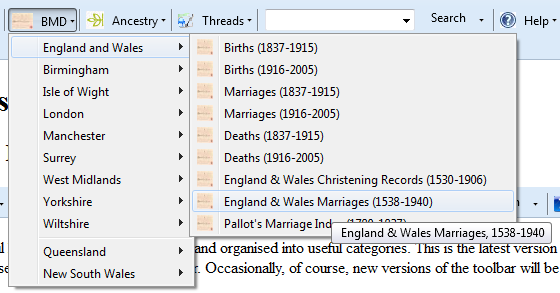
Sample BMD menu
I hope you like the new toolbar and that it helps you in your research.
Thanks to Pete from linuxbox.co.uk for his article on creating the Consumer Action Group Toolbar and Scott Root for his XML Developer’s Toolbar.